Evaluating the Paper Page Marker Mockup for Design Presentation
In the competitive landscape of digital design and print-on-demand sales, the visual presentation of a product is often as critical as the product itself. For surface designers, authors, and stationery brands, showcasing artwork on tangible objects helps potential customers visualize the final result. The Paper Page Marker Mockup serves as a specialized tool in this process, offering a realistic digital environment to display bookmark designs. By utilizing high-resolution templates, creators can bridge the gap between digital files and physical products, providing a polished preview that enhances perceived value.
This article explores the functionality, benefits, and practical considerations of using a professional bookmark mockup. It aims to help designers determine whether this specific type of asset aligns with their workflow, technical capabilities, and marketing goals.
Understanding the Role of Bookmark Mockups
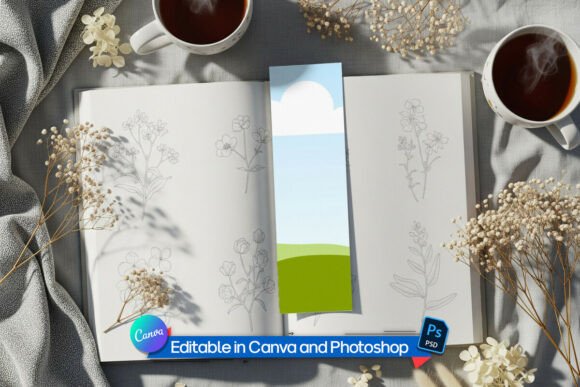
A mockup is essentially a digital template that allows designers to superimpose their artwork onto a photograph or 3D render of a real-world object. In the context of a Paper Page Marker Mockup, the base image is typically a high-quality photograph of a blank bookmark placed in an aesthetically pleasing setting. The primary function is to demonstrate how a two-dimensional pattern or illustration will appear when printed on paper, complete with realistic lighting, shadows, and texture.
The specific mockup discussed here features a standard aspect ratio of 2:6.5, which is one of the most common dimensions for commercial bookmarks. This standardization is crucial for designers who need to ensure their art fits industry norms without excessive cropping or resizing. By providing a pre-set canvas, the mockup removes the guesswork from proportioning, allowing the creator to focus entirely on the visual appeal of the design itself.
Key Features and Technical Compatibility
When evaluating a mockup asset, technical flexibility is a major deciding factor. Different designers operate within different software ecosystems, and a versatile mockup must accommodate these variations. The Professional Bookmark Mockup offers three distinct formats to cater to a broad audience:
- Photoshop and Photopea Compatibility: For users familiar with Adobe Photoshop or the free alternative Photopea, the mockup includes a layered PSD file. The core feature here is the use of Smart Objects. This functionality allows users to double-click a layer, paste their design, and save. The software automatically applies the necessary perspective distortions, lighting effects, and texture overlays. This automation ensures that even complex patterns wrap around the paper naturally, maintaining a high degree of realism.
- Canva Integration: Recognizing the growing popularity of browser-based design tools, this asset includes a Canva-compatible template. This is particularly beneficial for Etsy sellers or small business owners who may not have access to professional graphic design software. The process involves uploading a pattern and inserting it into a predefined frame. While it offers less control over fine-tuning shadows compared to Photoshop, it significantly lowers the barrier to entry for non-designers.
- Transparent PNG Files: For those who prefer using other editing software such as GIMP, Affinity Designer, or even mobile apps, a high-resolution transparent PNG is provided. This file contains the natural lighting and shadow elements on a transparent background. Users can place their design layer beneath the shadow layer to achieve a similar effect to the Smart Object method, though it may require manual adjustment of blending modes.
Benefits for Surface Designers and Authors
The primary advantage of using a Paper Page Marker Mockup is the enhancement of professional credibility. A flat digital file of a pattern can appear abstract and difficult for customers to contextualize. By placing that pattern on a realistic bookmark, the designer provides immediate context. Customers can see how the colors interact with the paper texture and how the scale of the pattern works in a narrow, vertical format.
For authors and publishers, bookmarks are effective marketing materials. A well-designed mockup allows them to create promotional images for social media or crowdfunding campaigns before committing to a large print run. This reduces financial risk by enabling market testing through visual previews. Furthermore, for stationery brands selling on platforms like Etsy or Amazon Handmade, high-quality mockups are essential for standing out in search results. Clean, modern aesthetics with crisp lighting help products appear premium, potentially justifying higher price points.
Tradeoffs and Considerations
While mockups are powerful tools, they are not without limitations. It is important for users to understand the difference between a digital representation and a physical proof. The lighting and color accuracy in a mockup depend on the original photograph used. If the mockup has a warm, yellowish tint due to indoor lighting, the designer’s colors may appear different than they would in neutral daylight. Therefore, mockups should be used for presentation and marketing, not for precise color calibration.
Another consideration is the level of customization. Pre-made mockups offer convenience but limit creative control over the environment. If a brand requires a specific background color or a unique prop arrangement to match their identity, a static mockup may feel restrictive. In such cases, investing in custom photography or 3D rendering software might be a more appropriate long-term solution, albeit with a steeper learning curve and higher cost.
Additionally, while the 2:6.5 ratio is popular, it is not universal. Designers creating oversized bookmarks or die-cut shapes may find this specific template unsuitable. It is essential to verify that the target product dimensions match the mockup’s specifications before purchasing or downloading.
When to Use This Mockup
This type of asset is a strong fit for several specific scenarios:
- Rapid Content Creation: Social media algorithms favor consistency and frequency. The ability to quickly drag and drop new designs into a standardized template allows creators to maintain a steady posting schedule without spending hours on photo shoots.
- Portfolio Development: Emerging designers can use these mockups to build a cohesive portfolio. By presenting all their work in a uniform, professional style, they demonstrate attention to detail and an understanding of commercial presentation standards.
- Client Presentations: Freelance designers can use these mockups to show clients how a proposed logo or illustration will look on merchandise. This helps clients visualize the end product, facilitating faster approval and reducing revision cycles.
Alternatives Worth Considering
If the static nature of a standard mockup does not meet your needs, there are alternatives to explore. For maximum realism, physical prototyping remains the gold standard. Printing a sample on actual cardstock and photographing it in natural light provides the most accurate representation of texture and color. However, this requires time, printing resources, and photography skills.
For those seeking more environmental variety, 3D modeling software like Blender or dedicated mockup generators offer the ability to rotate objects, change lighting angles, and swap backgrounds dynamically. These tools provide greater flexibility but require significant technical expertise. For beginners or those prioritizing efficiency, the balanced approach of a high-quality, editable PSD or Canva template often provides the best return on investment.
Making the Right Decision
Choosing the right presentation tool depends on your specific goals. If you are looking to streamline your workflow, maintain a consistent brand aesthetic, and present your designs professionally without the hassle of physical photography, the Paper Page Marker Mockup is a highly effective solution. Its multi-format compatibility ensures that regardless of your software preference, you can achieve a polished result.
However, if your primary concern is absolute color fidelity or if you require highly customized staging that deviates from standard norms, you may need to supplement mockups with physical samples or more advanced 3D tools. By understanding the strengths and limitations of digital mockups, designers can make informed decisions that enhance their product visibility while managing expectations regarding realism and customization.